Human-Centered Learning in a Tech-Driven World
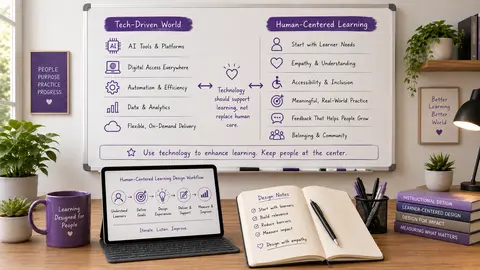
Technology is everywhere in learning now - from learning management systems and AI tools to simulations, analytics, and automated feedback. But more tools do not automatically create better learning. The real question is whether those tools make the experience clearer, easier, more accessible, and more human. In this post, you'll learn how to keep learning human-centered in a tech-driven world, when to use technology, when to protect human moments, and how to check whether a tool is actually helping your learners.
Why Human-Centered Learning Matters More Than Ever
It is easy to get impressed by what technology can do. A platform can personalize content, automate feedback, generate resources, and deliver learning almost anywhere. Those are useful capabilities. But learners do not experience a course as a list of features. They experience the whole environment. They notice whether directions make sense. They notice whether the workload feels manageable. They notice whether feedback feels supportive. They notice whether there is a real person behind the experience.
That is why human-centered learning starts with the learner, not the tool. Instead of asking, "What can this technology do?" start with, "What does this learner need?" That small shift changes everything.
Shift 1: Start With the Learner Need, Not the Tool
One of the biggest traps in instructional design is starting with a shiny tool and then trying to find a use for it. Maybe you see an AI tool, a virtual reality activity, or an interactive platform and think, "How can I fit this into my course?" That question is understandable, but it can lead you in the wrong direction.
Future-ready design asks a better question:
- What problem are learners trying to solve?
- Are they struggling to practice a skill safely?
- Do they need more clarity before they begin?
- Are they missing feedback?
- Do they need flexibility because they are busy adults?
- Do they need accessibility support?
Once you know the need, then you can decide whether technology is the right answer. Sometimes the answer is yes. A simulation might give learners a safe place to practice. AI might help them brainstorm ideas before a project. An accessibility tool might help more learners engage fully. But sometimes the best solution is simpler. A clear set of instructions may do more than another platform. A worked example may reduce confusion. A conversation may do more than automated guidance.
Ask these questions before adding any tool:
- What learner need does this support?
- What does this technology make better?
- What human element still matters here?
If you cannot answer the first question clearly, that is a sign to pause.
Shift 2: Protect Human Moments That Matter
Not everything in learning should be automated. Automation can save time, reduce repetitive work, and create consistency. That is valuable. But some moments carry extra meaning because another person is involved.
Feedback is one of the clearest examples. Automated feedback can tell a learner an answer is incorrect and point them to a resource. That can be helpful. But sometimes a learner needs more than correction. They need encouragement. They need someone to say, "I can see what you're trying to do here. You're on the right track. Let's work on this part." That kind of response does something automation usually cannot do well on its own. It builds confidence.
The same idea applies to mentoring, coaching, reflection, discussion, and difficult conversations. Technology can support those experiences, but it should not erase the human part that gives them meaning. Meaningful automation is different from maximum automation. The goal is not to remove people from the process. The goal is to use technology in ways that free people up for the moments where they matter most.
Think about where your learners need:
- Reassurance
- Conversation
- Judgment
- Emotional support
- Real-time clarification
- Personalized encouragement
Those are often the places where the human touch creates the most value.
Shift 3: Use Less Technology When Less Is Better
This may be the most surprising shift of all: future-ready design sometimes means using less technology, not more. Every additional login, notification, menu, button, and platform asks something of the learner. Even when each tool has a purpose, the combined experience can become tiring.
That is why one of the most important design questions is simple: Does this reduce friction, or does it add another layer to manage?
Technology should help learners focus on learning, not on figuring out how to navigate the experience.
- A reminder app may help a busy adult learner stay on track.
- An accessibility tool may give more learners access.
- A branching scenario may provide safe practice before a real task.
- A brainstorming tool may help someone get started.
Those are good uses of technology because they support the learning goal. But if a tool is mainly there because it is new, impressive, or available, it can become clutter instead of support. Learners remember confusion. They remember extra steps. They remember when the course felt like work just to access the work. That is why simpler is often better.
A good rule of thumb: Before adding another tool or feature, ask:
- Does this make learning clearer?
- Does this make the experience more accessible?
- Does this help learners practice something important?
- Does this reduce burden instead of increasing it?
If the answer is no, the best choice may be to leave it out.
A Practical Human-Centered Tech Check
If you want a simple way to apply all of this, use the human-centered tech check. Choose one technology you are currently using in a course, training, lesson, or learning experience. Then run it through these three questions
Question #1: What learner need does this support?
Be specific. Not "engagement" in the abstract, but a real need like practice, clarity, flexibility, collaboration, accessibility, or feedback. If the need is vague, the tool choice may be vague too.
Question #2: What does this technology make better?
Does it make something easier? Clearer? More realistic? More accessible? More useful? A tool does not need to do everything. It only needs to improve the experience in a meaningful way.
Question #3: What human element should remain?
Where do learners still need connection, judgment, encouragement, or conversation from another person? This is the question that keeps learning human. Sometimes the best role for technology is to create more room for human interaction, not replace it.
You can use this check for almost anything - automated feedback, discussion tools, AI support, interactive scenarios, reminders, or analytics. It helps you decide whether the tech is truly serving the learner or just adding complexity.
What Human-Centered Learning Feels Like to the Learner
One of the most useful questions you can ask is not "Did the technology work?" but "What did it feel like to use?"Because learners will often remember the experience more than the tool.
- Did they feel supported?
- Did they feel capable?
- Did they know what was expected of them?
- Did the technology help them move forward, or did it get in the way?
That is the real measure of human-centered learning.
Maya Angelou said, "People will never forget how you made them feel." That idea fits learning design perfectly. Learners may not remember every feature or every screen. They may not remember every tool. But they will remember whether the experience made them feel confident, confused, encouraged, or overwhelmed. When you design with that in mind, you create learning that is not only functional, but meaningful.
🖼️ Image Disclosure: This featured image was generated with AI using ChatGPT and reviewed by the author.

Award-Winning Instructional Designer, College Professor, Consultant, and Podcast Host
Jackie Pelegrin is an award-winning instructional designer, adjunct instructor at Grand Canyon University, podcast host, and consultant. Her experience spans higher education and corporate learning, and she holds an MBA and a master’s degree in Instructional Design and Technology. An Arizona native, Jackie enjoys reading, movies, games, and time with family and friends.
The Evolution of AI and Its Ethical Implications in Content Creation With Dr. Dwayne Wood