AI as Your Co-Designer: How to Use AI Without Replacing Human Judgment
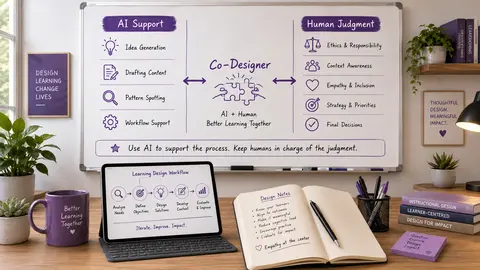
Artificial intelligence is showing up in more and more learning design workflows, and that can feel exciting, useful, overwhelming, and a little threatening all at once. If you are an instructional designer, educator, or learning leader, you are probably asking a practical question: how do you use AI well without letting it replace the human judgment that makes learning meaningful? In this post, you will learn how to treat AI as a co-designer instead of a shortcut or replacement. You will see where AI can support your thinking, where it should not make decisions for you, and how to review AI output with the kind of care good design requires.
Why AI Is Changing How We Design Learning
A few years ago, the big question in education was whether people should use AI at all. Now the conversation has shifted. The more practical question is: how can AI help us plan, draft, revise, and improve learning experiences without losing what matters most? That shift is important because AI is not only changing what we design. It is changing how we design.
Instead of thinking about AI as a tool that occasionally helps, it is becoming part of the daily workflow for many educators and designers. It can brainstorm faster, suggest examples, draft scenarios, revise language, and generate quiz questions. It can also help you think through structure, tone, accessibility, and learner support. But speed is not the same thing as quality. AI can produce something polished very quickly, but polished does not always mean accurate. Fast does not always mean aligned. Creative does not always mean appropriate. And efficient does not always mean effective.
That is why the most important shift is not “How do I get AI to do my work?” It is “Where does AI help my thinking, and where does human judgment need to stay in charge?”For learning design, that distinction matters because you understand context in a way AI does not. You understand the learners, the goals, the constraints, the emotional weight of the experience, and the difference between activity and actual learning. AI can generate options. You decide which options deserve to become part of the final design.
AI as a Co-Designer, Not a Shortcut
The phrase “AI as your co-designer” is useful because it keeps the right boundaries in place. A shortcut tries to skip thinking. A co-designer helps you think more clearly. That difference matters. If you treat AI like a content machine, you may ask it to write the lesson, create the quiz, draft the prompt, and build the activity. Then you copy, paste, and move on. That can save time, but it often creates problems later. Maybe the activity does not align with the learning objective. Maybe the example sounds generic or does not fit your audience. Maybe the assessment measures the wrong thing. Maybe the language does not sound like you. Maybe the design looks complete without actually supporting learning.
When you treat AI as a co-designer, you use it differently.
- You ask it to help you explore options instead of making the final choice.
- You ask it to challenge a draft instead of simply producing one.
- You ask it to suggest alternatives, identify gaps, simplify language, or help you see the design from another angle.
- Then you decide what to keep, what to revise, what to question, and what to throw out completely.
That is the core of future-ready design: not handing over the process, but guiding it with intention.
The Difference Between Generating and Designing
AI is very good at generating. It can create a lot of content quickly. Designing is different. Designing requires judgment. It requires decisions about purpose, sequence, pacing, tone, accessibility, and relevance. It also requires a sense of what real learners need, not just what sounds impressive on the page.
That is why more content is not always better content. Sometimes learners do not need another paragraph. They need a clearer example. Sometimes they do not need more information. They need practice. Sometimes they do not need a longer explanation. They need a better question. If you keep that distinction in mind, AI becomes more useful, not less. It stops being a content dump and becomes a thinking partner.
Three Small Shifts That Make AI More Useful
You do not have to reinvent your whole workflow to use AI better. Often, the biggest improvements come from small changes in how you ask for help.
Move from “Give Me the Answer” to “Help Me Explore Options”
One of the simplest ways to improve your use of AI is to stop asking for the final version too early. Instead of saying, “Write a discussion prompt about ethical AI,” try something more open and strategic: “Give me three possible discussion prompt approaches for graduate students learning about ethical AI use in instructional design. One should focus on learner privacy, one on bias, and one on academic integrity.”
That kind of prompt keeps you in the designer role. You are not asking AI to decide everything for you. You are asking it to show you possibilities so you can make a better choice. This is especially useful when you are early in the design process. Options help you compare directions, combine ideas, and notice what feels strongest for your learners.
Move from “Create More Content” to “Improve the Learning Experience”
AI is often used to produce more - more text, more examples, more questions, more ideas. But more is not always what the learner needs. A better use of AI is to ask how it can improve the experience. For example:
- How could I turn this explanation into a short practice activity?
- What part of these instructions might confuse learners?
- How can I make this scenario more realistic for adult learners in a workplace setting?
- Where does this lesson need a clearer example or better feedback?
These prompts shift the focus from volume to design quality. They help you use AI to strengthen the experience, not just inflate the content.
Move from “Trust the Output” to “Review With Human Judgment”
This may be the most important shift of all. AI output should always be reviewed, not skimmed, not assumed, but reviewed. Your review process should check for:
- Accuracy
- Alignment
- Accessibility
- Tone
- Bias
- Relevance
A helpful way to think about it is this: AI can draft, but humans decide. If the objective is weak, revise it. If the example is inaccurate, fix it. If the activity is too shallow, deepen it. If the language is unclear, clarify it. If the tone feels off, make it sound more human. If the design does not support the learner, redesign it.
That is where your expertise matters most. AI may help you move faster, but human judgment helps you move in the right direction.
Try the AI Co-Design Compass This Week
If you want a simple way to apply this approach, try the AI Co-Design Compass. Choose one small design task. Not a whole course. Not an entire module. Just one task. It could be:
- Revising an assignment
- Creating a practice activity
- Simplifying instructions
- Brainstorming examples
- Turning content into a scenario
Then move through four steps.
Step 1: Set the Direction
Before you ask AI for anything, define the learning goal, audience, context, and constraints.
For example: “I am designing for adult learners in an online graduate course. The goal is for learners to evaluate whether AI-generated responses are accurate, ethical, and useful. The activity should take about 15 minutes.”That is much better than saying, “Create an AI activity.”
Clear direction leads to better output because it gives the model something specific to work with. It also keeps you focused on the learning purpose instead of getting distracted by whatever the tool happens to produce.
Step 2: Ask for Options
Ask AI for two or three possible approaches, not one final answer. This gives you room to compare, combine, and revise. It also helps you stay in the role of evaluator rather than passive consumer.
The goal is not to accept the first good-looking result. The goal is to find the best fit for your learners.
Step 3: Apply the Human Filter
Review the output through four filters:
- Is it aligned?
- Is it accurate?
- Is it accessible?
- Is it human-centered?
These questions matter because AI can sound confident even when it is wrong, vague, or poorly matched to your audience. Your job is to slow it down and ask whether the idea actually serves the learner.
Step 4: Revise with Intention
The final step is where your expertise really shows. Revise the output so it fits your learners, your voice, your course, and your purpose.
The goal is not to use AI output exactly as it appears. The goal is to use AI as part of a thoughtful design process. That is what makes the process collaborative instead of mechanical.
The Real Question to Ask About AI
As you think about your own workflow, the most useful question is not “Should I use AI or not?”A better question is:
Where could AI help me think more clearly without taking over the thinking completely?
That question matters because AI use is not all or nothing. You do not have to use it for every part of your design process. You also do not have to avoid it completely.
Maybe it helps you brainstorm. Maybe it helps you organize. Maybe it helps you spot gaps. Maybe it helps you revise. Maybe it helps you generate examples that you then adapt.
But the deeper design decisions still belong to you. That is what future-ready designers understand. They do not hand over the process. They learn how to guide it, question it, refine it, and use it in service of meaningful learning.
If you want to go deeper on this topic, you may also want to explore related posts on ethical AI use in education or accessibility in digital learning design.
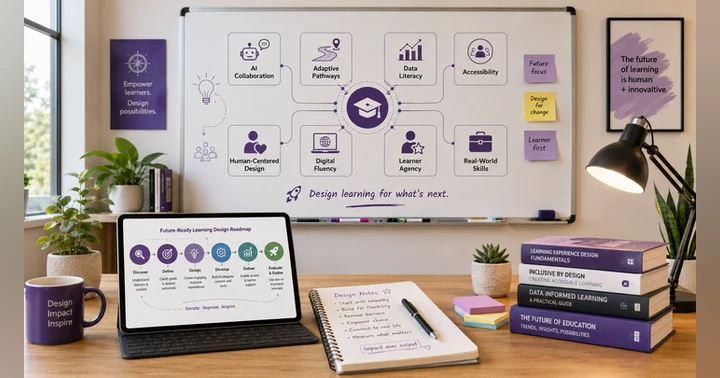
🖼️ Image Disclosure: This featured image was generated with AI using ChatGPT and reviewed by the author.

Award-Winning Instructional Designer, College Professor, Consultant, and Podcast Host
Jackie Pelegrin is an award-winning instructional designer, consultant, and adjunct instructor at Grand Canyon University. Her experience spans higher education and corporate learning, and she holds an MBA and a master’s degree in Instructional Design and Technology. An Arizona native, Jackie enjoys reading, movies, games, and time with family and friends.

Embracing AI in Instructional Design With Dr. Dwayne Wood