Designing for the Hybrid Workforce of Tomorrow
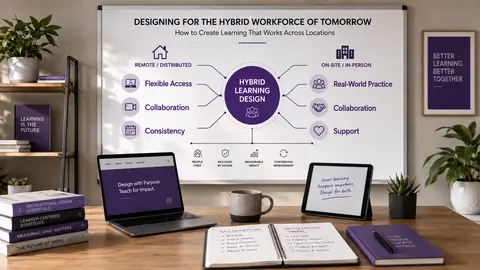
Hybrid work is no longer a temporary adjustment; it is the new normal for many organizations. That shift changes more than where people work. It changes how they learn, how they collaborate, and whether training feels accessible or exclusive. In this post, you’ll learn how to move from location-dependent learning to location-inclusive learning. We cover why hybrid design matters, the three biggest shifts instructional designers need to make, and a simple hybrid learning design check you can use right away.
Why Hybrid Learning Needs a New Design Mindset
If you’re designing learning for a hybrid workforce, the biggest mistake is assuming the in-room experience is the “real” one and everyone else gets a digital version. That approach usually creates a second-class experience for remote learners. Hybrid work has become a stable part of the workplace, not an edge case. As Jackie notes in the episode, Gallup data shows that among U.S. employees whose jobs can be done remotely, 52% work in a hybrid arrangement, 26% work exclusively remotely, and only 22% work fully on-site. The takeaway is simple: if your learners are spread across locations, your learning design needs to reflect that reality from the start (Gallup, Inc., 2022).
This is not just a technology issue. It is an experience and equity issue. A hybrid session can look equal on paper while still giving some people more access, more visibility, and more opportunity to participate than others. That is why future-ready design starts with a better question: How do we build learning that works for everyone, regardless of location?
Shift #1: Design for Access First, Not the Physical Room
The first mindset shift is moving away from treating the physical room as the default experience. If you design everything for the people in the room and then try to “support” remote learners afterward, those remote learners often end up with less access, less clarity, and fewer chances to contribute. Instead, start by asking: What does everyone need access to?
That includes:
- Core resources
- Clear instructions
- Practice opportunities
- Feedback channels
- Ways to ask questions and contribute
The goal is not to make every experience identical. It is to make the important parts accessible to everyone. Here’s what that can look like in practice:
- Use a shared digital workspace instead of a whiteboard only people in the room can see
- Offer digital handouts instead of paper materials available only onsite
- Create a common question channel instead of relying only on raised hands
- Make key instructions visible in the chat, document, or learning platform
These choices matter because they remove the assumption that learning only happens where the facilitator is physically standing. When access is designed from the beginning, location becomes less of a barrier and more of a detail. A simple rule helps here: if a learner needs to be physically present to get the core experience, the design is probably not hybrid-ready yet.
Shift #2: Use Purposeful Flexibility, Not More Meetings
A common response to hybrid work is to add more meetings, more webinars, and more live calls. But more synchronous time does not automatically create better learning. Sometimes it just creates calendar overload. Future-ready learning asks a better question: Why do learners need to be together for this?
If the purpose is discussion, coaching, practice, or connection, live time can be valuable. If the purpose is simply delivering information, asynchronous learning may be the better choice. This is where purposeful flexibility matters. Instead of forcing everything into a live session, separate what needs real-time interaction from what learners can do on their own schedule. For example:
- Learners review a short video or resource before the live session
- They complete a quick reflection or knowledge check asynchronously
- Live time is reserved for practice, feedback, and discussion
- A demonstration happens in advance, and the session is used for coaching
This approach respects people’s time and attention. It also makes hybrid learning more practical for teams spread across offices, time zones, and work schedules. The point is not to eliminate live learning. It is to use live learning where it adds the most value. If people can absorb the content just as well on their own, save the live session for what only live interaction can do.
Shift #3: Design for Equitable Participation, Not Just Equal Presence
Being present is not the same as participating. That distinction becomes especially important in hybrid learning, where someone can be in the meeting and still have very little opportunity to contribute. Remote learners may be harder to hear, slower to interject, or unintentionally overlooked when the room takes over the conversation. That is why participation has to be designed, not assumed. A few practical ways to build more equitable participation:
- Use a shared collaborative document that everyone can access
- Give learners time to think before asking for responses
- Use chat, polls, or breakout groups to diversify participation
- Create structured discussion turns so one mode of presence does not dominate
- Intentionally invite remote participants to share, rather than waiting for them to jump in
These design choices help prevent the “room advantage” from shaping the experience. In a hybrid setting, the people sitting together can easily become the loudest voices, even when that is not your intention. Good design balances the field. One useful way to think about equity is this: everyone does not need to participate in exactly the same way, but everyone should have a meaningful way to engage.
A Simple Hybrid Learning Design Check You Can Use This Week
You do not need to redesign your entire learning program overnight. Start with one session, workshop, onboarding experience, or training activity that includes both remote and onsite learners, and ask these three questions:
Question #1: Can everyone access the core experience?
Can learners get the resources, instructions, activities, and support they need no matter where they are working? Look for anything that only works if someone is physically in the room. That might include paper handouts, instructions spoken only once, a whiteboard nobody else can see, or side conversations that shape the learning but are never captured.
Question #2: Is participation designed or assumed?
How will learners respond, collaborate, practice, or ask questions? If you have not built in a way for people to contribute, participation will default to whoever is easiest to hear or fastest to speak. Good hybrid learning gives people multiple, clear pathways to engage.
Question #3: What truly needs to happen together?
Identify the parts that genuinely benefit from synchronous interaction. This is where you decide what should stay live, such as coaching, discussion, practice, or feedback, and what could be moved to a more flexible format. The goal is not to make everything live. The goal is to make the live time worth showing up for. Run every hybrid learning experience through these three questions, and you will quickly spot the gaps.
What Hybrid Learning Really Means for the Future of Work
At its core, hybrid learning is not about choosing between in-person and virtual delivery. It is about designing for a workplace where people may move between locations, schedules, and modes of connection. That means learning can no longer depend on who happens to be in the room. A remote learner should not have to work harder just to keep up. An onsite learner should not receive a richer experience simply because they are physically closer to the facilitator. The design needs to account for both.
Jackie’s key message is worth remembering: the goal is not to make every experience identical. It is to make sure that location does not determine a learner’s opportunity to succeed. That standard changes how you plan everything from onboarding to workshops to leadership development. It encourages you to think beyond delivery and focus on access, participation, and flexibility.
References
Gallup, Inc. (2022, September 26). Indicator: Hybrid work. Gallup.com. https://www.gallup.com/401384/indicator-hybrid-work.aspx?utm_source=chatgpt.com
🖼️ Image Disclosure: This featured image was generated with AI using ChatGPT and reviewed by the author.

Award-Winning Instructional Designer, College Professor, Consultant, and Podcast Host
Jackie Pelegrin is an award-winning instructional designer, adjunct instructor at Grand Canyon University, podcast host, and consultant. Her experience spans higher education and corporate learning, and she holds an MBA and a master’s degree in Instructional Design and Technology. An Arizona native, Jackie enjoys reading, movies, games, and time with family and friends.
Boosting Young Lives: The Importance of Teaching Life Skills With Rob Heller