Apple Podcasts
 Spotify
 Youtube Music
 Amazon Music
 iHeartRadio
 Podcast Addict
 PocketCasts
  Podchaser
  Deezer
  PlayerFM
  Castro
  Castbox
  Goodpods
 Accessibility Is a Competitive Edge With Maxwell Ivey
Accessibility isn’t a box to tick at launch; it’s the backbone of products people actually trust. Jackie sat down with Maxwell “The Blind Blogger” Ivey—founder of The Accessibility Advantage and longtime advocate for inclusive digital experiences—to unpack how small, thoughtful changes can eliminate friction, reduce support costs, and open doors to more learners and customers.
Max shares four moves you can make this week: highlight the main tasks, simplify design, cut clutter, and build keyboard-first. Along the way, we talk about turning complaints into collaboration, testing with real users, and creating advisory loops with customer service to catch issues early. If you’re leading an organization or building courses, websites, or services, this conversation gives you a roadmap to reduce friction, meet real needs, and unlock accessibility as a competitive edge.
Enjoyed the conversation? Follow and share the show, leave a review to help others find it, and send this to a teammate who can champion accessibility with you.
🔗 Website and Social Links:
Please visit Maxwell Ivey’s website and social media links below.
📢 Call-to-Action: Want to learn more or work with Maxwell? Visit The Accessibility Advantage to explore his latest accessibility content and reach out about consulting, training, or support.
🎧 Next Episode: Part 2: Practical ways to make websites and learning materials accessible for everyone (tools, workflow, and quick wins).
Join PodMatch!Use the link to join PodMatch, a place for hosts and guests to connect.
Disclaimer: This post contains affiliate links. If you make a purchase, I may receive a commission at no extra cost to you.
💟 Designing with Love + allows you to support the show by keeping the mic on and the ideas flowing. Click on the link above to provide your support.
☕ Buy Me a Coffee is another way you can support the show, either as a one-time gift or through a monthly subscription.
🗣️ Want to be a guest on Designing with Love? Send Jackie Pelegrin a message on PodMatch, here: Be a guest on the show
🌐 Check out the show's website here: Designing with Love
📱 Send a text to the show by clicking the Send Jackie a Text link above.
👍🏼 Please make sure to like and share this episode with others. Here's to great learning!
00:00 - Meet Max And The Mission
01:05 - From Carnival Roots To Advocacy
03:20 - Beyond Compliance: The Business Case
06:40 - Turn Complaints Into Collaboration
09:54 - Overwhelm, Not Fear: Start Small
12:44 - Education’s Vendor Dependence
15:44 - Captions, AD, & Real-World Use
19:14 - Culture Change In 60 Seconds
20:49 - The Button You Can’t Click
23:44 - Plain Language & Clear Forms
26:44 - Test, Iterate, & Ask For Help
29:04 - Four Moves To Advance Accessibility
31:44 - What’s Next & How To Connect
33:29 - Gratitude & Support
Meet Max And The Mission
Jackie Pelegrin
Hello, and welcome to the Designing with Love podcast. I am your host, Jackie Pellegrin, where my goal is to bring you information, tips, and tricks as an instructional designer. Hello, instructional designers and educators. Welcome to episode 124 of the Designing with Love Podcast. Today I'm joined by Maxwell Ivey, founder of the Accessibility Advantage, to talk about why accessibility matters for organizations and educational institutions and what's at stake when it's treated as an afterthought. Maxwell is also known as the Blind Blogger, has spent nearly two decades advocating for more accessible digital experiences. And he's served as an accessibility advisor to PodMatch, where we connected for today's conversation. Maxwell, welcome to the show.
SPEAKER_01
Thank you for having me. It's great to get to talk to you again.
Jackie Pelegrin
So to start, Max, can you tell us a little bit about yourself and share what inspired you to start the Accessibility Advantage?
From Carnival Roots To Advocacy
SPEAKER_01
Right. So I am an almost totally blind former carnival owner and was involved in the business with my family for over 15 years. When my father passed away due to lung cancer, we weren't ready to run the carnival by ourselves, and within a few years we were out of business. I needed something to do with myself, so I did the only thing I thought I knew at that time, which was I started to help other people sell their surplus equipment. And people said I had to have a website. So I, in order to have a website in 2007, the only option for a blind person was to teach themselves to code HTML, which is how I got online. And as you know, having an online business, whether it's a podcast or you're selling products, there are so many things you have to learn how to do or find somebody to do for you. And people were inspired by the challenges and the way I took them on with joy. They encouraged me to share more about being a blind entrepreneur, and that that led to the blind blogger, which was a name people were using for me online at the time, mainly because most people with disabilities were hiding their challenges out of fear that they would be stigmatized and they would not find success in this relatively new platform we call the internet. But, you know, being the son of Carnes, I was out there and never thought nothing about it. And recently learned that because I've been open about my disability for so long, I gave other people the freedom and the courage to put themselves out there openly with whatever disability or challenges they may have. Besides the um at the blind blogger, I started out doing uh life goals coaching. People didn't want me to do that, so I started uh getting paid to book people on podcasts, and that kind of led me to accessibility because in 2021 Alex San Filippo started PodMax, and since I was operating a service to get people booked, I was like, well, any place I can find more good shows is a is a good thing. But I was disappointed that it was not accessible. So started having conversations with Alex.
Beyond Compliance: The Business Case
SPEAKER_01
Um we figured out some workarounds, I provided advice on a volunteer basis and later came on as the as part of the advisory board, as you mentioned. Um but we fixed things as we could, and when we couldn't fix them in the short term, we came up with ways to work around them, and then I would be responsible for communicating those to cut existing customers or or potential customers. Uh and that's where it started. Along the way, AudioEye.com, which is an enterprise-level company in the accessibility arena, uh talked me into going to work as a writer for their website and later as a quality assurance person for some of their clients. And I say talked me into it because when they first approached me about going to work, I tried to talk them out of hiring me. I didn't feel like I was qualified or that I really wanted to be in accessibility, but they they won me over. And um, you know, for the last four or five years, I've been writing for various publications. I've done public speaking. I sing and write songs as as part of my continuing growth as the blind blogger, and I even have a song called The Accessibility Advantage for my podcast now. And basically I just keep doing the next thing. I figure out a way to overcome the obstacles. But I really wish that I didn't have to overcome the obstacles, which is why I do my best to help people understand why it is in their best interest to embrace accessibility or to improve existing accessibility. And I feel like that's the that's the great niche for me in this whole discussion because there's a whole lot of people approaching accessibility from the point of view of compliance, of lawsuits, of negative publicity campaigns. I'm probably one of the few that's like, let's talk about the benefits.
Jackie Pelegrin
Right, exactly. That's great. And that leads into my next question, which is great. You did you tagged that really well. So when leaders hear the term accessibility, many do think compliance, right? Uh so what do you want organizations and even schools to understand about accessibility as a mission, risk, and opportunity? And what's the real cost of ignoring it, do you think?
SPEAKER_01
Right. Well, I think specifically in the educational field, the real cost of ignoring accessibility is having frustrated students and parents who are going to either complain or act out or possibly take you to court. And I hate to emphasize compliance, but sometimes compliance has to go side hand in hand with the competitive advantage approach. But really, I I talked to somebody just this week who was saying, you know, when you when you improve systems on your website, you have fewer people calling your customer service teams. The customer service teams are one of your highest turnover places in employment. And when employment turns over, it costs people money. So in general, when we when we refuse to build in accessibility in the long run, we're making things harder for our users, for the people who care about our users, but most important, we're making things harder for ourselves.
Jackie Pelegrin
Right. That's so true because when you talk about customer service, I used to work in customer service across several organizations,
Turn Complaints Into Collaboration
Jackie Pelegrin
and and accessibility wasn't really thought of uh during those times. It was when I was in college and then later on in life. And I and yeah, when I think back to those times, yeah, it's uh it's sad when yeah, when there's there's a lot of frustration among the employees that are on the front lines, right? On the phones, taking calls. Yeah, and yeah.
SPEAKER_01
And the thing is, the really sad thing about that is your customer service people are in a great position to help you create an accessibility community or advisory board or whatever you want to call it, because people that have a disability that want to use your product or service, when they call in or send an email with a question or a complaint, that's an opportunity to make a connection with somebody who can help you avoid doing stuff that makes them complain. You know, um, but most companies have not thought that far and they don't have a system in place to move those those questions from somebody with a disability to a particularly tasked person to address those issues. You know, um one of the things I love doing when I'm going to use a new product online is I I like to reach out to the site owner through their customer service, and I'll usually send them an email like this, I'll say something to the effect of um I am a totally blind person using a computer with a screen reader. Uh I use I use voiceover on a Mac running Safari. I'm about to start using your product or your service. I don't anticipate any problems, but if I do, um hopefully we can we can have a conversation or we can collaborate and figure out a way around them. And the reason I do that is because most times when customer service is from somebody with a disability, the first time they hear from us, we're angry, we're frustrated, we're complaining. So I like to connect with somebody uh before I need to connect with somebody.
Jackie Pelegrin
Right, yeah, establish that that relationship at the very beginning. Yeah, I like that. A lot of us don't think about that, right?
SPEAKER_01
Right. Well, you know, we're all so busy. We're all we've all got so many jobs. I mean, you mentioned earlier that you're starting another podcast with a friend of ours, uh, Daniel, and on uh on true crime or miss or cozy mysteries, excuse me. But if we can't do something new or different, we have to learn different new things. We have to think differently. And so, you know, there's a
Overwhelm, Not Fear: Start Small
SPEAKER_01
I I honestly don't even think it's fear anymore when it comes to embracing accessibility. I think it's just overwhelm. I think there are a certain number of people who just don't know what they don't know, but most of it is like, man, I've already got so much on my plate that I don't know how to chew, and you want me to add accessibility. Um and I think one of the things we could really do to help business owners and educators, pretty much anybody that had that does that operates through an online portal, is get away from this uh me, me, me, we have to have accessibility now and focus more on accessibility as a process or a progress. And when we can get away from the immediacy, the um that has to be done now, and it has to be done the way I am telling you to do it, um, we can help a lot of people overcome the the roadblocks or the things that are holding them back from from starting down the road towards towards accessibility. And you know, that's where communication and collaboration comes in because I used to code my website for five years from 2007 to 2012, but I was never really good at it. I understand just enough to be dangerous or to run my website on a bad day if I have to, you know. Um but it gives me some empathy and it lets me understand that look, I don't know how I really don't know all that goes into building a website, even building a website on WordPress. I don't know all that stuff. I know accessibility, I know best practices, I know workflow, I know how people with uh using adaptive technology like screen readers, screen magnifiers, and mechanical switch devices navigate the internet. So I have to bring what I'm genius at and meet the designer, the developer, the marketer, and let them share with me what they are genius at, and then go. The objective is for somebody with a disability to be able to use this site to perform this function. How do we get there and do it without needing you to use my solution? And that's you know, that's how we're we're gonna get to more accessibility when we can remove the fear and the overwhelm and the harsh feelings about you know, you're a terrible person if you're not wanting to do it the way I want to do it and do it yesterday, you know?
Jackie Pelegrin
Hmm. Wow, that's amazing. So they so come so organizations and schools will either try to rush it, right, and not do a good job, or they'll delay it, right? So what do you see is the most common uh thing that organizations and maybe even schools do? Do they usually rush it and then do a poor job, or do they usually delay
Education’s Vendor Dependence
Jackie Pelegrin
uh incorporating accessibility?
SPEAKER_01
Right. I would say depending on the size of the organization, it's generally delay, delay, delay, let's uh or ignore, ignore, ignore. Um and you don't think about it. I I went to I went to a what they used to call a mainstream high school. That's not a term we hear much anymore. Right. But when I went to high school, we were really new to the idea of blind people not going to a state school for the blind. And we had we had three blind students or visually impaired students during my entire high school career. There was a woman who graduated when I was a freshman. Uh, she went off to study interior design. There was me, and there was another guy who was a freshman when I was a graduating senior, and he had to follow behind me, and he hated me for that. Um but that's neither here nor there. But we had three visually impaired students over the course of four years, and we never had more than one, or really maybe one and a half at a time. So, and that was in a very garage high school with a graduating class of um of over a thousand, student body of over four thousand, almost five thousand. We had three blind students in four years. So I would imagine the education system is gonna be more likely to put things off and hope that they don't have to deal with it. The other thing that educational organizations are gonna do, and a lot of companies are doing, and it gets them in trouble, is they expect the third-party businesses that they work with to handle accessibility for them. And I imagine that's probably pretty common in the education arena as well, that whatever platform you're using for your online learning or for your to make things accessible for people with disabilities in the classroom, you're getting from a third-party provider and expecting them to take care of accessibility. Would would I be on the right track there?
Jackie Pelegrin
I think you are, yes, because we have uh not only do we have textbook vendors that we work with, right? The big major publishers like you know, Sengage and and all of those, but we also have uh what they call LTIs, which are learning uh integrated type of systems that go into those. So, for example, we there's one called Go React, which is a video-based platform that is utilized and it integrates with our learning management system at the university, and it does you know all of that. And so the student does doesn't have to go outside of the learning management system. They can just stay right there, click on start assignment, and then they do their video and and they're they're done with it. And then the instructor grades right in there, so it's really nice. But um, you know, it's true, you know, we have to work with those those vendors to make sure that it's it's accessible and it meets ADA compliance requirements.
SPEAKER_01
Right. For example, these videos,
Captions, AD, & Real-World Use
SPEAKER_01
do they come with audio descriptions or at the very minimum, have the people recording the videos have have they been instructed how to give instructions so they can be followed by somebody who's visually impaired just as well as somebody who can see the screen?
Jackie Pelegrin
That's a good question because they're mostly you know student type of assignments. So that's true. And there are students that do have those accessibility issues. So uh the good news is that Go React has that has it built in so that it gives closed captions once it processes the video. It allows the closed captions and transcripts to be there. So that's good. Um, the only thing is, and something I've actually mentioned before uh to Go React is uh what it'll do, it won't identify who the speakers are. Now the instructor can go in and but it'll just say speaker one and speaker two, speaker three, right? In the transcript. And I'm like, I wonder if there's a way that the technology will allow you to actually get the name of the student in there, even if it's just the first name, right? Um, and and things like that. But the good news is it wouldn't violate FERFA or anything like that because it just stays contained within that class. It doesn't go outside of it. So um, but yeah, there's just but the good news is they've got like the markers and things like that. Those are um you can you can have a a screen reader read those markers and things like that. So it's not just color, you know, it's not dependent upon color. So it's really good. So I'm really happy that they that they yeah, that they picked a company that not only meets uh the HIPAA and FERPA and all of those type of compliance areas, but also accessibility as well. So yeah, so it's really neat. So I think it's important.
SPEAKER_01
You know, you just taught me something I didn't know about my own field, and I want to thank you for that. I did not realize that in the in the in the area of education, there's not only the issue of accessibility, but there's the issue of medical privacy and then information privacy on top of accessibility. So when you consider the multiple challenges, then I think one of the things I talk about a lot would really fit in well from the the side of the people with the disabilities in in the education arena, which is I feel like the fact that I've had to do so many things for myself on my website has given me a lot of empathy for what it takes for somebody to develop somebody, develop something to make it accessible, especially to make it accessible to screen readers, which is pretty much the hardest thing that you can do in accessibility. Uh and so if we could show a little more empathy to the people trying to make all this happen, and you know, the beginning of empathy is hearing people, letting them share with you what the challenges are so you can better understand how to participate and co and collaborate. So the the fact that you just told me about these additional concerns will help me in the future. Should somebody in the educational field want to hire me, or should I decide to to pitch myself to an educational institution either for contract work or employment? Right. To share that with me.
Jackie Pelegrin
Yes, absolutely. I think it's great when we can learn from each other. It's really, really fantastic. Yeah, it's one of those things I didn't really think about either until I got into higher education. And and then about it, even accessibility until like I'm we've mentioned offline before, where we had
Culture Change In 60 Seconds
Jackie Pelegrin
a blind student that was in our professional counseling program, and it really taught me a lot. It taught and it taught me that empathy that you're talking about, uh having empathy towards all learners, right? And that's that comes back to that universal design for learning, the UDL principles, right? And what those are about. Yeah. So it's really neat how it there's so much involved in it, and it's more than what me many people realize. So it's it's amazing.
SPEAKER_01
Yeah, and the really cool thing about this whole universal design approach, which at this point in most industries is more aspirational than than um uh than actually being being practiced on on a large scale. But the thing about the universal design is is it will not only address accessibility, but it will make the experience for all users better as a result of considering people of all abilities in the design process.
Jackie Pelegrin
Right, exactly. Yeah, it's interesting because I I did some episodes some solo episodes about universal design for learning, and then I did one about accessibility. And what was interesting, Max, is that as you know, screen readers were developed for blind people, right? And uh and captions were developed for people that were hard of hearing or deaf. But what's interesting is that it it was a good reminder when I was doing the research about the accessibility one, it talked about how even something with closed captions uh transcripts can also be helpful for people that are in a noisy environment or something like that. So they don't have to necessarily have a disability. It
The Button You Can’t Click
Jackie Pelegrin
could be that they're they're you know watching something while they're on the on a noisy train or something like that, and they can't they can't hear what they're what they're doing. So yeah, so it's it's very interesting. Yeah.
SPEAKER_01
Absolutely. There's there's uh two statistics that I've heard over the last year. One is that um 37% of people under the age of 40 will not watch an Instagram or TikTok video if it doesn't have closed captions for the reasons that you just mentioned. And 85% of Facebook users will not watch a video if it doesn't have closed captions, and that's of all view of all users.
Jackie Pelegrin
Wow. That's amazing. I think uh I think everybody needs to know that, whether no matter where they work or what they do, because that's a that's a high number. Wow. So they're leaving out a lot of their listeners or their users, right? Wow, that's yeah.
SPEAKER_01
Yes, yeah, and and you know, you mentioned how things were created for specifically for the blind or the the hearing disabled or hearing impaired. Um, one of the things that's just now starting to be picked up on by sighted people is um audio descriptions, and that's where during when when you're watching a movie or TV show, and in some cases live events, they can have a secondary audio track that will describe what's going on on screen whenever people aren't talking. And right now audio description is it's mandated, but there are a lot of caveats in the law to help the uh television and movie providers to you know to get there eventually without making it really, really hard on them. So I don't know what the current you know stipulation is as to how many shows or how many hours uh a month or a quarter they have to describe, but the audio descriptions are. Becoming the kind of thing that sighted people are discovering. Hey, if we turn on the audio descriptions, we can listen to the TV and follow along with what's going on, and we can then turn our back and go do the dishes, or go outside and go to the window and look and look outside, or you know, work on our computer or vacuum or whatever we want to do, as long as we can still hear the TV, we can still see the TV. So audio descriptions is one of those things that's starting to be picked up on by sighted people. And um I have friends who are sighted, they're like, you know, Max, there's some shows that even though I can see them, I can't watch them and completely understand what's going on without those descriptions, you know.
Jackie Pelegrin
Wow. That's amazing. Oh wow, that's cool. Wow. So, Max, if you had 60 seconds with a superintendent, a dean at a school, or maybe even a CEO or department head, what would you say to convince them
Plain Language & Clear Forms
Jackie Pelegrin
that accessibility needs to be part of the culture, not a last-minute checklist?
SPEAKER_01
I would say that embracing accessibility shows that they have concern for everyone who will come through their system or their business. And that whether they see any positive results from that effort or not, the fact that they care enough to do it will go a long way with uh business partners, consumers, advocates, educators, and uh most especially with the search engines, the AI bots, and the things on the internet that drive traffic to our businesses. I don't know how much an educational institution depends on traffic for their for their their success, but you know, there's just so many good reasons to embrace accessibility, and not all of them have anything to do with being disabled.
Jackie Pelegrin
Mm-hmm. Right. That's true. Wow, that's amazing. I love that. So here's a a bonus question. I think a lot of my listeners would like because we love we're storytellers, right? We love to share stories. So can you share a story or maybe even a common scenario where a simple accessibility improvement made a noticeable difference for users and what it taught the organization?
SPEAKER_01
Right. So most people already know about alternative text where you add text to an image so that people with screen readers can know that it's there and know what it is. Um so that's that's not something that I would include in this, except people really should put the same effort into the script descriptions that they put into creating them. But I would say the most important thing is make sure that I can click the button to actually hire you, book you, buy from you, sign up to you, because I can't tell you how many times I've gotten to the end of a form. So I've filled I've filled up a shopping cart and I'm ready to check out, and I've given them my credit card information. All I gotta do is press one button. That one button is not coded for keyboard navigation, it's coded for a mouse. And most people using adaptive technology don't have access to a mouse. So now I'm stuck. I get to I have to decide, do I need what's in the basket bad enough to call somebody from one of the other rooms in the house and have them do it for me? Or am I mad enough to just back out and start over and go find somebody else? Or, you know, what how do I feel about the purchase, the company, my experience? And of course, some of this just depends on how long a process it was between picking items and checking out, because some people have some very long checkout systems. Uh, but this is one of those things, it can really cost you business because very few of us don't have competitors. You know,
Test, Iterate, & Ask For Help
SPEAKER_01
nowadays even Amazon has uh, or excuse me, even Walmart has Costco now, you know. I mean, right. So uh that's the one thing. Remember that not everybody has access to a mouse button. And if you're going to set up a system where you want people to take actions, you do not want to frustrate those actions by delivering it in a manner that can't be accessed by people using adaptive technology. And the thing is, is you know, uh when you when you code things correctly for accessibility, that will also make it easier for older people who don't need accessibility but depend on keyboards more than mice, or uh also people who are spending a lot of time on their mobile devices. Sometimes the same button I can't click uh when you're visiting that website on a mobile device, you can't click it there either. And so I would say of the one thing people don't know that they really should know is that blind people and disabled people, most of us don't have a mouse. And so everything has to be built with keyboard navigation first.
Jackie Pelegrin
Hmm, that's so important. Wow. Yeah, we can't assume everybody has the same tools to work with, right? Yep.
SPEAKER_01
This is true. And you know what's what's what's really interesting is a lot of times uh I'll go to a website and it will say this website behaves better in Chrome or better in Firefox, or sometimes it'll even say, you can't use this website with Safari. And changing operating systems, say if you're gonna have to switch from a Windows computer to a Mac to get better access, or switching from Safari, which is the one many of us blind people are used to to Chrome, requires changing how you navigate a website to the point you go from doing things on autopilot to having to think about every step you take, because somebody was either wasn't able to code for your favorite browser or they decided they didn't have to, and that they decided they would just tell you to go to a different browser. Um, that's another one of those things that's very frustrating
Four Moves To Advance Accessibility
SPEAKER_01
because, like I say, you get used to the tools you have. And if somebody comes along and goes, no, you can't use that toolbox, you got to use this toolbox, it makes building things a lot harder.
Jackie Pelegrin
Ah, so true. You know, I was even on a government website a couple weeks ago, and the navigation max was horrible. I was like, where's the log? Where do I go to learn more about things? I mean, I went to the little hamburger uh, you know, icon at the top right and couldn't even figure out how to log in or sign up or anything. And I'm like, and yet they want people to, you know, have this accessibility, right? And to be able to go online and do things so that you don't have to call somebody and get help. But yeah, it was very frustrating. I'm like, how do I go about going through here? And it's so it just was not user-friendly, it was not easy to navigate.
SPEAKER_01
Yeah, I was frustrated. You know, you bring up uh an important additional uh point about accessibility. Sometimes a website is accessible, but it's not understandable. And um, I really encourage people to put more thought into their instructions, into the language that shows up when I forget when I first get to their page, in the naming architecture they use for their menu and their headings, to put some thought into those names because for somebody who's visually impaired, a lot of times that's all you're gonna have is those names or those opening phrases of text before you have to try to navigate a website. And then with forms, it's even more so. In a form, um more more instruction is needed, and things that may seem intuitive to you because you can look at the screen will not necessarily be intuitive to me. And so having a way to give me good, clear instructions, and also if I'm required to enter information, a way to know immediately that I've done it correctly or I've done it incorrectly, so that I don't have to wait till I get to the end of a page of entries to find out that three or four of them were wrong and wonder if they're actually going to tell me which ones are wrong or if I'm gonna have to guess.
Jackie Pelegrin
Oh, that's good because you know, I thought I that's true, because there's in fields, I never thought of this before. You know, I go to fill it out and it'll tell me if something's required or and I or I miss something, right? Yeah, that's true. It'll it'll do red text, and I, you know, now it makes me think, I wonder what they do for screen readers, you know, to tell you
What’s Next & How To Connect
Jackie Pelegrin
that you're incorrect. Uh for us that have the visual um capability, yeah, we can see it because it'll it'll give that little asterisk that it's a required field, right? And then if you don't fill it in, it'll it'll say you have four errors, go fix those. But it's not always even intuitive there either, because I'm like, where's the errors? You know, it's got to point it out to me. I need to know where the errors are so I know what to fix. Yeah.
SPEAKER_01
And some and some of them are really basic. Like I'm sure most people wouldn't would wouldn't think a second thought about asking for a phone number or a or even a social security number, and not tell me whether I'm supposed to put spaces in or not put spaces in. Yes. Or whether I'm supposed to use dashes or not use dashes. You know, I mean that seems like a really simple thing, but sometimes that's the last thing I gotta figure out. Um the other thing is sometimes, and I hate this when people do it, is they will put a required field on the page so that in order to get to it, I have to go past the button that says submit to find it. So sometimes I will press submit several times, and it'll keep telling me I'm something wrong. And I go back through all the stuff that came before the submit button, and there's nothing wrong, and then I finally realize, oh, wait a minute, there's something down there that I have to enter. Um and the other one that catches me a lot is when people create forms, they will ask people for images, and sometimes the the button to submit an image doesn't show up until I attempt to submit, and then then it will show up, and then I hopefully will find an easy process
Gratitude & Support
SPEAKER_01
to upload my image. And you know, recently I created a form for my podcast, The Accessibility Advantage. I'm trying to get more organized so that I can do put out more content without getting overwhelmed myself. And one of the things we that a friend of mine, um Leanne Riber at uh Second Skin Society, it's a fitness app for people who are disabled, along with people who are able-bodied that can work out virtually together with uh and some of and many of the instructors on the platform have disabilities. It's really cool business. When I asked her to fill out, when I asked her to fill out my form, she says, Mike, this form is missing one really important thing. I said, What's it missing? She said, It's missing a place for people to describe the image that they submitted to you as their headshot.
Jackie Pelegrin
I'm like, I should have thought of that, you know. Wow. Oh, well, it's good that you tested it out with her. I mean, and I think that's what a lot of people need to do is test it out. See, does it make sense? Does it flow well for anybody, right? So having a button, you know, too soon doesn't make sense. The instructions don't, yeah, they don't make sense.
SPEAKER_01
I highly encourage people test your own form, if nothing else. If if you're you're gonna ask your friends to see if the form works, test it yourself.
Jackie Pelegrin
Right. And see how how think of yourself as using it for the first time, right? Uh as I say, put a different hat on and and do that, right? It makes such a difference, right? Yeah, absolutely.
SPEAKER_01
Yeah, and and don't and don't be afraid to ask for help because I asked for help in two different ways, actually, when I was building the form. Um, the form is part of my CRM, which is with less annoying CRM, which is a very accessible platform. And I reached I just finished a job for them, giving them some action items for their second annual accessibility week. Um, I not only asked friends to try out the form, let me know what they thought about it. I had a lot of back and forth with the customer service person from Less Annoying, um, trying to figure out the ideal order, um, any additional explanation or descriptions, and uh, you know, rearranging some of the things, uh changing the name, changing some of the instructions, and then making sure that when they completed the form, that it sent me the information and that it directed them to the link to book the the actual podcast interview. So, you know, this is a system I set up, but it's but it's a it's a system that we still tested from a couple of different approaches to make sure that it would work well.
Jackie Pelegrin
Right. Yeah, you want to make sure that experience is as good as it can be. Yeah, that's great. I love that, Max. So as we wrap up, if my listeners only did three things, so you can think of three things, this week to move accessibility forward in their organization or institution, what three would you recommend to someone?
SPEAKER_01
I would say look at your website and see look at your website and see if it actually is focused on what you do. Have you made the most important thing the most important thing? Because quite often improving user experience for everybody will lead to improved accessibility for people with disabilities. So are you focusing on the main thing? Can I quickly get to those main things? Second thing is simple design is best. The more complicated widgets and whatever you have on your website, the more likely you are to create an accessibility bottleneck for some of your users. And some of the things that cause problems for a disabled person can cause problems for mobile device users or for older uh potential users. So keep the design simple. And three, take a minimalist approach. Look at every page on your website and think to yourself does this information need to be on the website at all? Does it need to be on this page? Can I reduce the amount of text? Can I make the text plainer in its language? Can I reduce the number of images? Or if I have a slideshow, can I reduce the number of slides? Uh if I have videos embedded in my homepage, can I are there are these videos actually serving the the need of getting the customer to the final decision point? So I would say those are the three most important things. And I would say if you if you give me a fourth, it would be um it would be keyboard navigation first. So those four things would be, those four things would be focus on the most important thing, have a simple design, take a minimalist approach, and design for keyboard navigation first.
Jackie Pelegrin
Wow, I love that. I'm glad you added that little bonus fourth one in there. That's good. I like it. Great. Well, Max, thank you so much for sharing your insights today. This was a powerful look at why accessibility matters and what organizations and educational institutions risk when they overlook it. And for listeners, this is part one of a part two series. So uh, Max will come back, which is great. So in part two, we'll get practical and talk through the best ways to make websites and materials accessible to everyone. Before we wrap up this episode, Max, what's the best place for listeners to follow you or to connect?
SPEAKER_01
Right. I'm looking forward to that next one. And I think uh especially talking about accessible documents along with accessible websites is going to be very helpful to people. And they can find me at the accessibilityadvantage.com or on LinkedIn. I'm Maxwell IV, IV is Victor EY, and I welcome uh new friends and uh great conversations without scripts. So don't feel like you have to want to buy something, book me or hire me in order to reach out to me. I look forward to speaking with some of your audience and um sparking the desire or understanding to improve accessibility.
Jackie Pelegrin
I love it. Great. Well, thank you so much, Max. I appreciate it. And we'll uh we'll record episode two uh down the road. So I'll get all the questions ready and we'll uh we'll hit the ground running with that one too.
SPEAKER_01
All right, thank you so much.
Jackie Pelegrin
Thanks, Max. Appreciate it. Thank you for taking some time to listen to this podcast episode today. Your support means the world to me. If you'd like to help keep the podcast going, you can share it with a friend or colleague, leave a heartfelt review, or offer a monetary contribution. Every act of support, big or small, makes a difference, and I'm truly thankful for you.
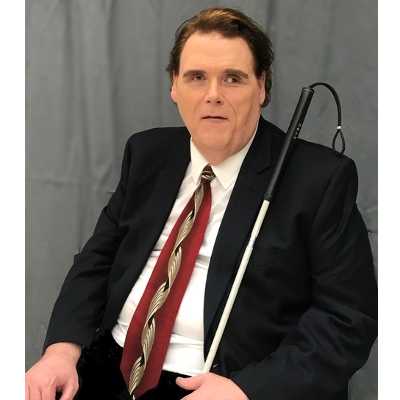
Founder of The Accessibility Advantage
Known as The Blind Blogger, Maxwell is a serial online entrepreneur with almost 2 decades of experience educating people about the need for and benefits of improving accessibility.
He has been working with clients for 5 years, including serving as the accessibility advisor to Podmatch.
He has been published in Consumer Reports, writes a regular column for PHP Architect called Barrier Free Bytes, and regularly shares his knowledge with online publications.
As the founder of The Accessibility Advantage, his message is that accessibility isn't just about compliance. It's about reputation, innovation, and growth.